The AI for Excelyou can trust
with the numbers.
FormulAI brings AI to Excel for FP&A and finance teams — build and verify formulas, run variance and reconciliation, and health-check your models. Answers are computed on your data, not guessed.
 Microsoft Excel add-in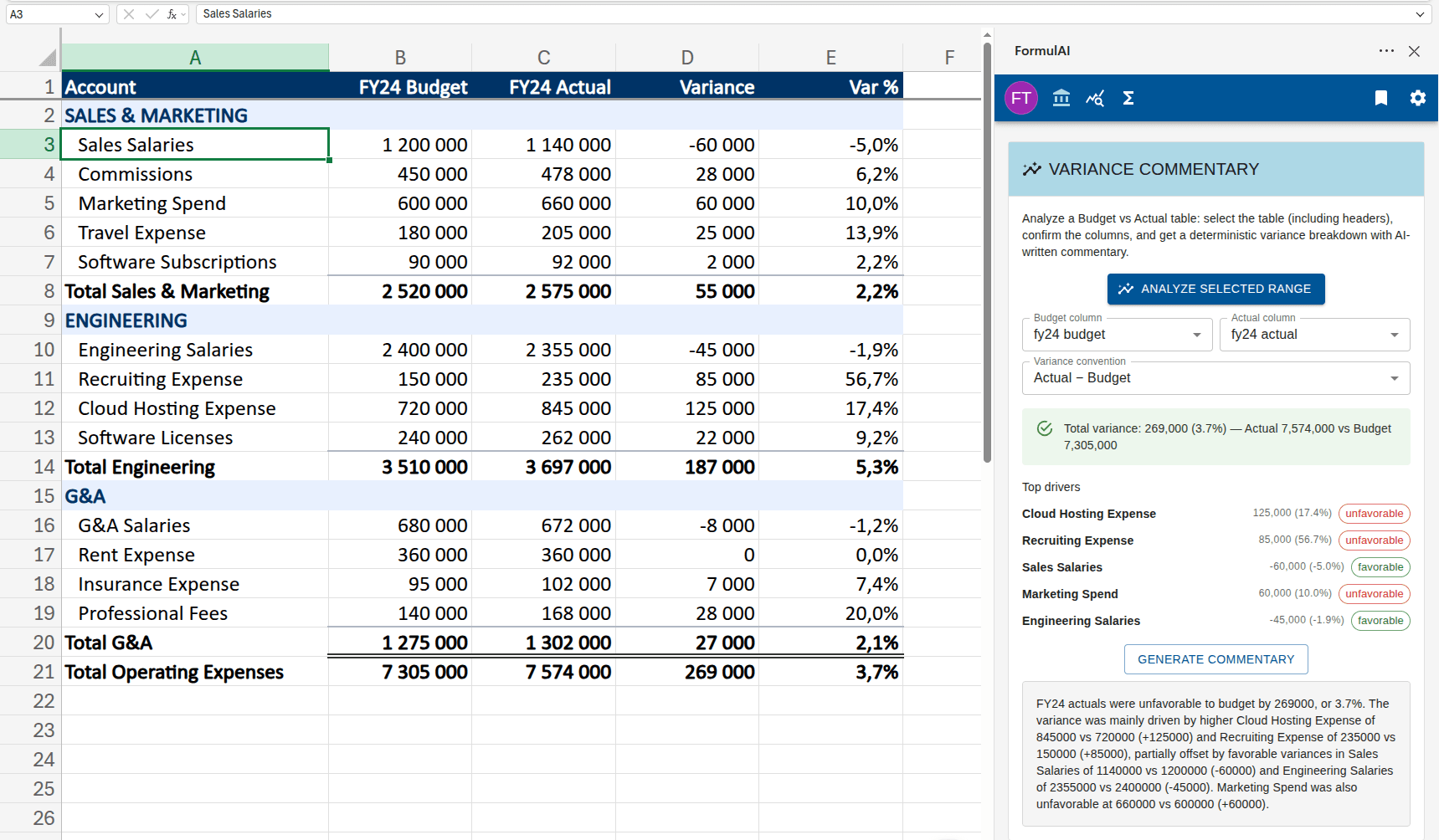

One add-in for the whole finance workflow.
FormulAI organizes its tools the way you work — FP&A, Data Analysis, and Formula Tools — all without leaving Excel.
FP&A
Pressure-test the model.
Variance Commentary
Budget-vs-actual breakdown with ranked drivers and plain-English commentary — numbers computed, not guessed.
Reconciliation
Match two sources (ledger vs sub-ledger, bank vs book) and surface mismatches, gaps, and duplicate keys.
Workbook Health Check
Audit a variance pack for broken math, inconsistent formulas, hardcodes, and tie-out breaks.
Data Analysis
Get answers from your data.
Query Worksheet
Ask questions in plain English and get computed results. Your rows never leave Excel.
Data Simulator
Generate realistic sample datasets from a header row or a simple instruction.
Formula Tools
Build and understand formulas.
Formula Builder
Describe what you need in plain language and get the right formula, verified on your data.
Formula Doctor
Scan for formula errors and apply AI fixes, each checked against your sheet.
Explain this Cell
Trace where a cell’s value comes from and flag risky inputs and references.
AI you can put in front of the CFO.
Generic AI assistants guess. For finance work, a wrong number is worse than no answer. FormulAI is built so you can trust what it gives you.
Verified on your data
Every generated formula is checked against your sheet.
FormulAI evaluates the formulas it suggests on your actual workbook and shows the result before you commit — so you never paste a formula and hope.
Deterministic, not guessed
Variance, reconciliation, and health checks are computed.
The numbers come from real calculations, not a language model. AI is used to explain results in plain English — never to invent them.
Your data stays in Excel
Queries run locally; we send only what we must.
Natural-language queries run in a private in-browser database. For AI features we transmit only headers and computed summaries — your rows stay in the workbook.
FormulAI is now integrated with Microsoft Excel


Bring FP&A-grade AI into your workbook. Get the Microsoft Excel add-in and build, verify, and audit your models without leaving Excel.
Microsoft Add-InSimple pricing, for everyone.
There is a plan for everyone. Choose the one that best suits your needs.
Unlimited
Perfect for frequent users or small businesses.
$8.99$3.99/month
- All features of Free plan
- Unlimited formula & query requests
- FP&A tools: variance, reconciliation, health check
- Formula Doctor & Explain this Cell
- Self-verifying formulas
- Excel add-in integration
- Bookmarks
Free
Good for anyone who uses spreadsheets occasionally.
$0/month
- Up to 10 AI requests per month
- Formula builder & explainer
- Natural-language data query
- Microsoft Excel add-in
Enterprise
For enterprise companies that need volume discount.
Contact us
- All features of Unlimited plan
- Centralized team billing
- Priority support
- Volume discount

Frequently asked questions
If you can’t find what you’re looking for, email our support team and we will get back to you swiftly.
How is FormulAI different from Microsoft Copilot?
FormulAI is built for finance work where a wrong number is unacceptable. Its FP&A tools — variance, reconciliation, and the model health check — are computed deterministically, and every generated formula is verified against your data. AI writes the explanation; it never invents the numbers.
What can FormulAI do for FP&A teams?
Generate variance commentary from a budget-vs-actual table, reconcile two sources (e.g. ledger vs sub-ledger), and run a Workbook Health Check that flags broken variance math, inconsistent formulas, hardcoded inputs, and subtotal tie-out breaks before a model goes to the CFO.
Is my spreadsheet data sent to the cloud?
Your data stays in Excel. Natural-language queries run in a private in-browser database, and for AI features we transmit only column headers and computed summaries — not your underlying rows.
How does the unlimited plan differ from the free version?
The free plan includes up to 10 AI requests per month. The unlimited plan adds unlimited formula and query requests, the full FP&A toolset (variance, reconciliation, health check), Formula Doctor, Explain this Cell, bookmarks, and the Excel add-in.
Do I need to sign in inside Excel?
The Excel add-in supports Microsoft single sign-on, and falls back to email and password sign-in when SSO is not available.
Can we expect more features in the future?
Absolutely! We are always working on improving FormulAI. If you have any requests or ideas, we will be happy to hear about them.
How do I contact customer support?
Send us an email at info@formulai.xyz and someone will respond to you.
I lost my password, how do I get into my account?
You can request for your password to be reset from the password reset page